Starter Example
Introduction
Purpose
This example
- introduces the
StudPycore objects - and demonstrates a complete workflow for a study.
Use Case
In this example, we consider a binary executable simulation tool that:
- takes a
main.jsonfile as input; - produces a
results.txtfile as output, containing a single numeric value.

The input and output files are assumed to have the following structures:
main.json
{
    "static_attributes": {
        "static_attribute_1": 1000
    },
    "thermodynamic": {
        "temperature": 273
    },
    "seed": 3305
}
results.txt
Our goal is to generate a dataset of inputs/outputs by varying the temperature and seed parameters.
Design workflow
| # | Description |
|---|---|
| 1 | Define the Files Builder which will create the case folder structure and case input file for the simulation |
| 2 | Define the Case Builder and its parameters (1 linear and 1 random) which will create the cases and associated values |
| 3 | Define the Study which associates Files Builder and Case Builder |
| 4 | Define the Engine which says what and how to execute a simulation |
| 5 | Define the Study Runner which will orchestrate the creation of cases, creation of inputs, execute of the Engine, aggregates results and create a report and execute it |
Example
Script
Create a example.py file and paste the following script.
from pathlib import Path

from studpy.cases import CaseBuilder
from studpy.inputs import FilesBuilder
from studpy import Study
from studpy.runtime import SimRunnerEngine
from studpy.runtime.study_parallel_runner import StudyParallelRunner


# ##############################################################################
# 1. Creation of a FilesBuilder

files_builder = FilesBuilder.load({
    "processors": [{
        "relative_path": "main.json",
        "source": '{"static_attributes":{"static_attribute_1": 1000}}',
    }]
})

# ##############################################################################
# 2. Creation of a CaseBuilder

case_builder = CaseBuilder.load({
    "parameters": [
        {
            "identifier": "Temperature",
            "input_path": "thermodynamic.temperature",
            "config": {"type": "linear", "size": 3, "low": 273, "high": 700}
        },
        {
            "identifier": "Seed",
            "input_path": "seed",
            "config": {"type": "random_int", "size": 2, "low": 0, "high": 6000}
        },
    ]
})

# ##############################################################################
# 3. Creation of the Study

study = Study(
    case_builder=case_builder,
    files_builder=files_builder,
    folder="tests",
)

# ##############################################################################
# 4. Creation of the Sim Runner Engine

runner_engine = SimRunnerEngine.load(
    {"runtime_folder_path": Path(""),},
    # {"main": {"type": "command", "command_template": "shuf -i 1-100 -n 1 > results.txt", "cwd": "outputs_folder_path"}}
    {"main": {
        "type": "command",
        "command_template": "jq -r '.thermodynamic.temperature * .seed' {INPUTS_FOLDER_PATH}/main.json > results.txt",
        "cwd": "outputs_folder_path"
    }}
)


# ##############################################################################
# 5 And 6. Creation of the Runner and run it

# Runner
StudyParallelRunner(
    runner_engine = runner_engine,
    study  = study,
    report_html = True,
).execute()
Results
Run the script
Open the generated report at tests/outputs/report.html
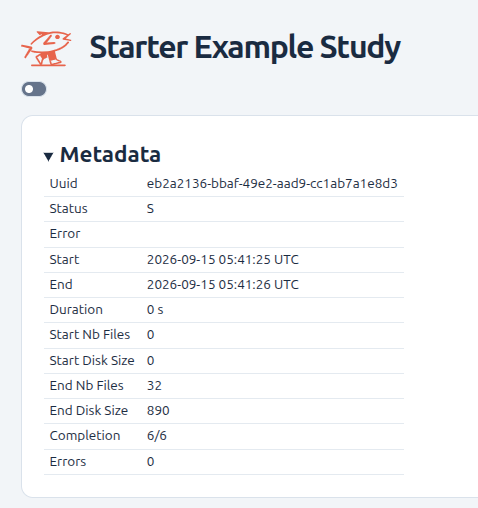
In the Results section you should see :
TODO
TODO
Explanations
1. Define the File Builder
# ##############################################################################
# 1. Creation of a FilesBuilder

files_builder = FilesBuilder.load({
    "processors": [{
        "relative_path": "main.json",
        "source": '{"static_attributes":{"static_attribute_1": 1000}}',
    }]
})
Purposes:
- Define the main target folder that will contain all input and output files.
- Specify how the input files are generated.
See API FilesBuilder
2. Define the Case Builder and its parameters
# ##############################################################################
# 2. Creation of a CaseBuilder

case_builder = CaseBuilder.load({
    "parameters": [
        {
            "identifier": "Temperature",
            "input_path": "thermodynamic.temperature",
            "config": {"type": "linear", "size": 3, "low": 273, "high": 700}
        },
        {
            "identifier": "Seed",
            "input_path": "seed",
            "config": {"type": "random_int", "size": 2, "low": 0, "high": 6000}
        },
    ]
})
You can build cases by adding:
Results:
Show the datasets of parameters values like :
3. Define the Study
# ##############################################################################
# 3. Creation of the Study

study = Study(
    case_builder=case_builder,
    files_builder=files_builder,
    folder="tests",
)
You can manipulate the creation of cases by adding
Results:
- Create the cases folders and inputs files like :
tests/
├── cases/
│   ├── 0/
│   │   ├── inputs/
│   │   │   └── main.json
│   │   ├── logs/
│   │   └── outputs/
│   │
│   ├── 1/
│   │   ├── inputs/
│   │   │   └── main.json
│   │   ├── logs/
│   │   └── outputs/
│   │
│   ...
│
├── logs/
└── outputs/
with the cases values applied like in tests/cases/0/inputs/main.json:
{
    "static_attributes": {
        "static_attribute_1": 1000
    },
    "thermodynamic": {
        "temperature": 273.0
    },
    "seed": 5368.0
}
4. Define the Engine
# ##############################################################################
# 4. Creation of the Sim Runner Engine

runner_engine = SimRunnerEngine.load(
    {"runtime_folder_path": Path(""),},
    # {"main": {"type": "command", "command_template": "shuf -i 1-100 -n 1 > results.txt", "cwd": "outputs_folder_path"}}
    {"main": {
        "type": "command",
        "command_template": "jq -r '.thermodynamic.temperature * .seed' {INPUTS_FOLDER_PATH}/main.json > results.txt",
        "cwd": "outputs_folder_path"
    }}
)
5. and 6. Define the Runner and Run
# ##############################################################################
# 5 And 6. Creation of the Runner and run it

# Runner
StudyParallelRunner(
    runner_engine = runner_engine,
    study  = study,
    report_html = True,
).execute()
TODO
report
Results:
- Create the cases folders, inputs and results files like :
tests/
├── cases/
│   ├── 0/
│   │   ├── inputs/
│   │   │   └── main.json
│   │   ├── logs/
│   │   │   ├── err.log
│   │   │   └── std.log
│   │   └── outputs/
│   │       └── results.txt
│   │
│   ├── 1/
│   │   ├── inputs/
│   │   │   └── main.json
│   │   ├── logs/
│   │   │   ├── err.log
│   │   │   └── std.log
│   │   └── outputs/
│   │       └── results.txt
│   │
│   ...
│
├── logs/
│   ├── err.log
│   └── std.log
└── outputs/
TODO
report
```